Laser show software for MacThe AI laser show. Mapped in moments. Intuitively controlled.

Camera-assisted projection mapping with safe-zone suggestions, live control from an Akai APC40 MK2, and AI that writes the show to your music. All in one Mac app, ready to install at launch.

14-day free trial, no card Founders from $29.99/yr Works with LaserCube
JS Lasers — Show Builder
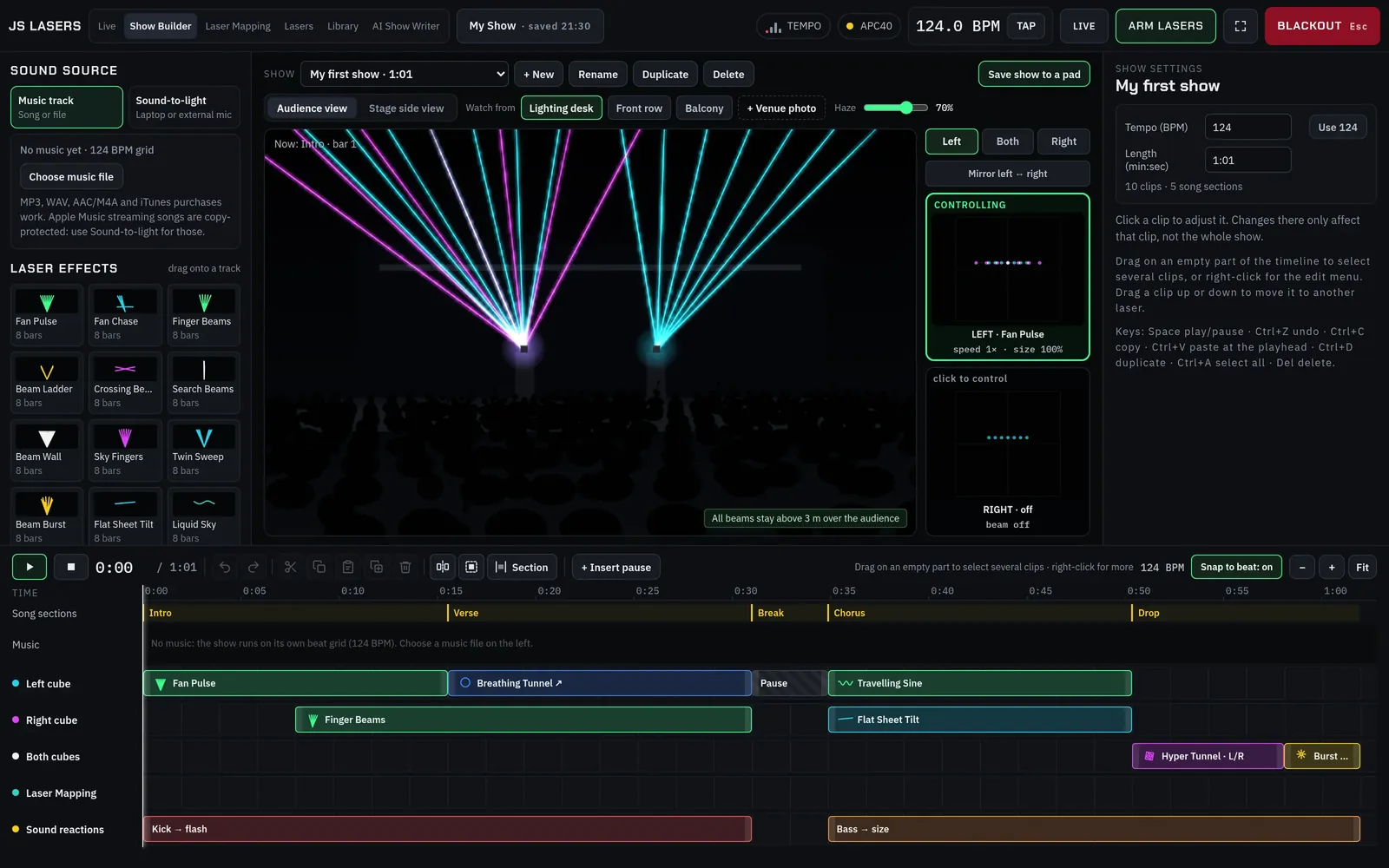
JS Lasers Show Builder with a 3D audience view of two lasers fanning beams over a crowd, and a timeline of laser effects below

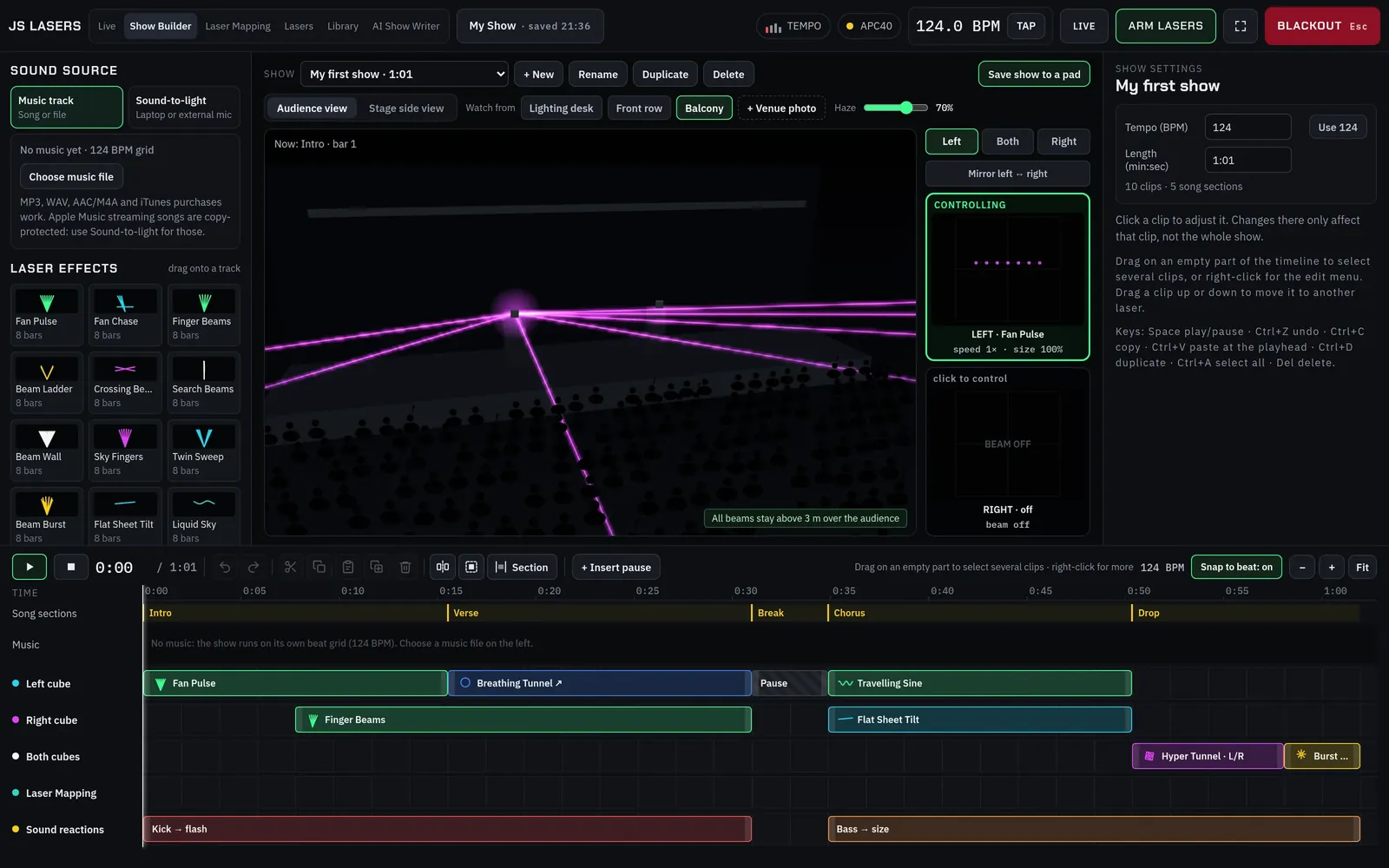
Show Builder: preview the whole show in haze from the lighting desk, front row or balcony.

67
music-reactive beam effects
40
APC40 pads, played like an instrument
0.5 s
safety watchdog blanks the beam
20
animated scenes, plus 54 drawings
Made for every stage
Concerts & bands
DJs
Clubs
Festivals
Weddings & events
Building projection
How it works

From download to your first beam, step by step.

Install and connect

At launch, download the app and install it like any Mac app. JS Lasers finds your LaserCubes on the network automatically, ready to name and calibrate.

Drop in the looks

Drag effects onto the APC40 pads or onto the Show Builder timeline. Preview everything with the lasers off.

Play it live

Arm the lasers and play from the APC40. Effects react to the kick, bass, mids and highs as you perform.

Live · Akai APC40 MK2

Play your lasers like an instrument.

Every pad on the APC40 MK2 becomes a look. Hit it on the beat, ride the faders and the beams react to the kick, bass, mids and highs in real time. No timecode, no pre-programming.

JS Lasers — Live
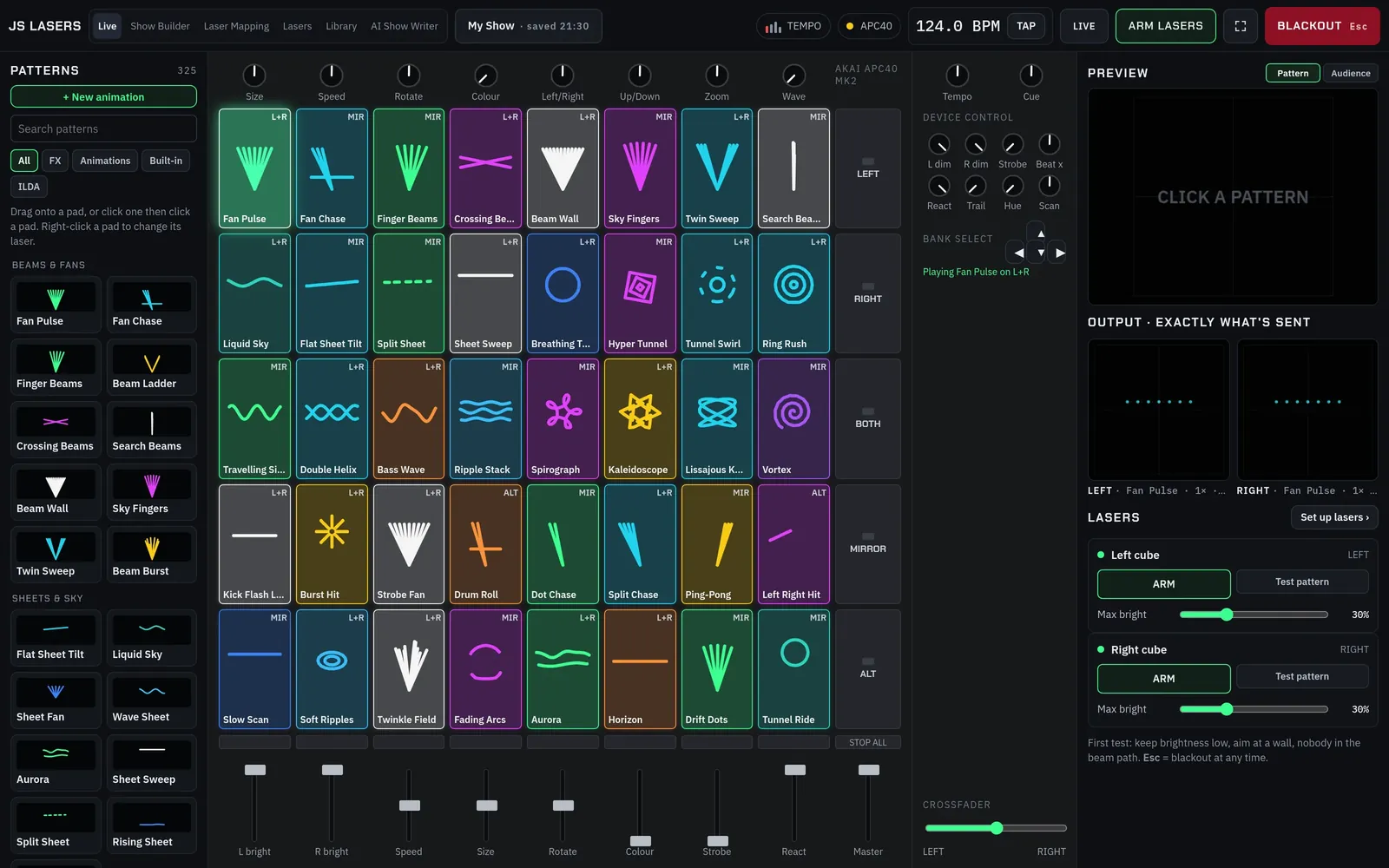
JS Lasers Live screen: an on-screen APC40 MK2 with 40 colourful effect pads, faders, knobs and live output previews for the left and right lasers

40 pads, 8 faders, one crossfader

Drag any effect onto a pad. The lights on your APC40 match the screen, so you always know what's loaded.

Locked to the music

67 haze-ready effects follow the kick, bass, mids and highs. At launch, use any mic or line input. Tap tempo when you need it.

Left, right, both or mirrored

Send each pad to one cube or both, mirrored or alternating, and see exactly what every laser is drawing.

Fan PulseSky FingersTwin SweepLiquid SkyTunnel SwirlRing RushDouble HelixBass WaveRipple StackKaleidoscopeVortexCrossing BeamsBeam WallHyper TunnelStrobe FanAuroraDrift DotsLissajous Knot+ 49 more
Show Builder

See the show in haze before the doors open.

Lay out a full show on a timeline with a track for each laser. At launch: load your track and JS Lasers finds the tempo and the song sections, and snaps every animation to the beat.

  • 3D audience view from the lighting desk, front row or balcony, even over a photo of the real venue.
  • Crowd-safety warnings if any beam dips below 3 m over the audience.
  • Beat-snapped clips that move and change across their length, with undo and redo.
  • Sound-reaction tracks so a show can still breathe with the music.
JS Lasers — Show Builder
Show Builder audience view from the balcony, with beams over the crowd and a timeline of laser clips and sound reactions below
Projection mapping

Draw on buildings with light.

Photograph the venue, trace its edges and bring every line to life. Perfect for NYE countdowns, launches, weddings and building shows.

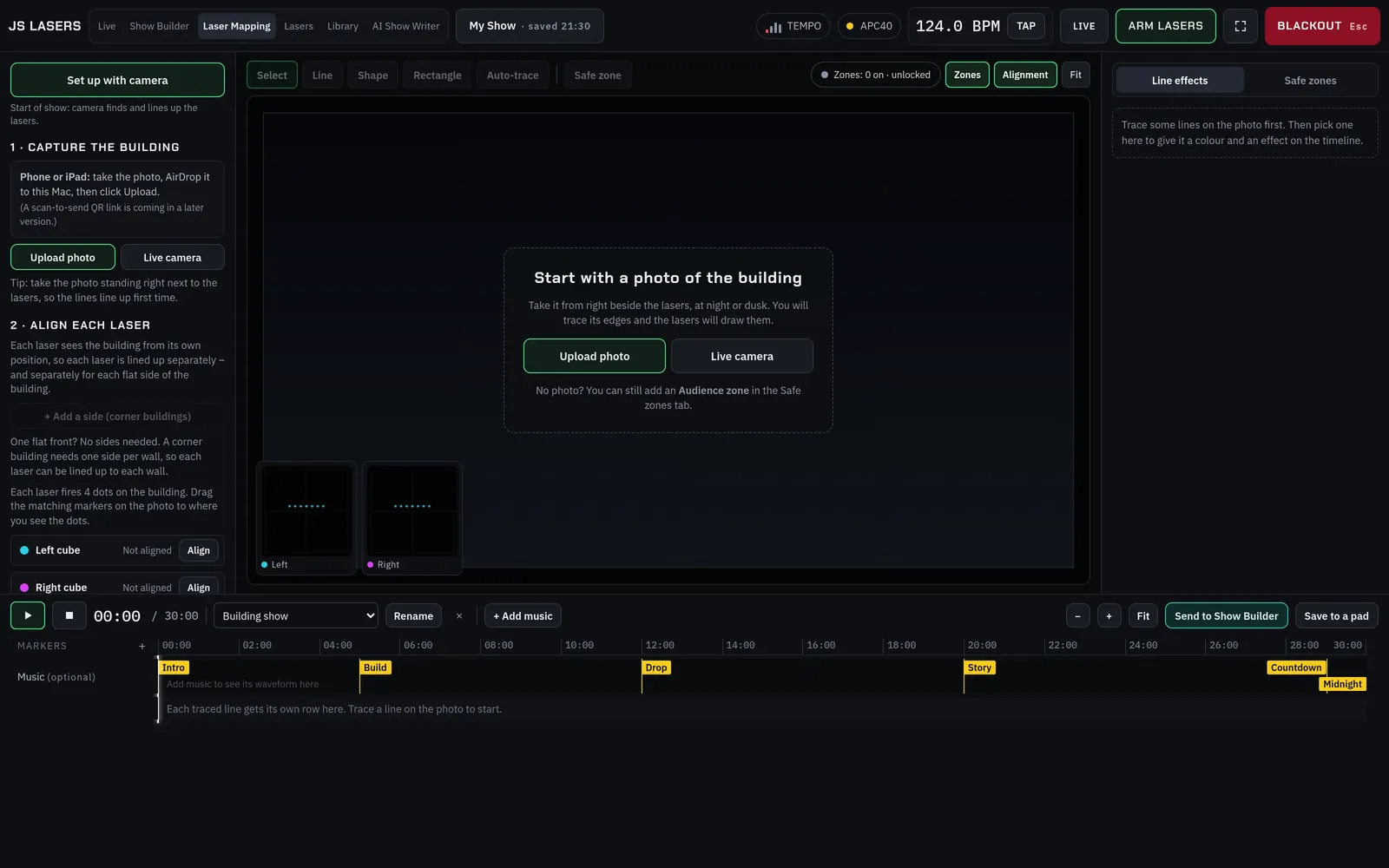
  • Camera set-up wizard finds each laser's projection area and lines it up for you.
  • Line effects like draw-on, chase, pulse and sparkle, on a timeline up to 30 minutes long.
  • Corner buildings split into flat sides, each aligned separately.
  • AI safety check marks windows, doors, people areas and sky, then suggests safe zones.
Illustration · traced facade
Laser Mapping
Laser Mapping screen with the camera set-up wizard and a mapping timeline with intro, build, drop and countdown markers
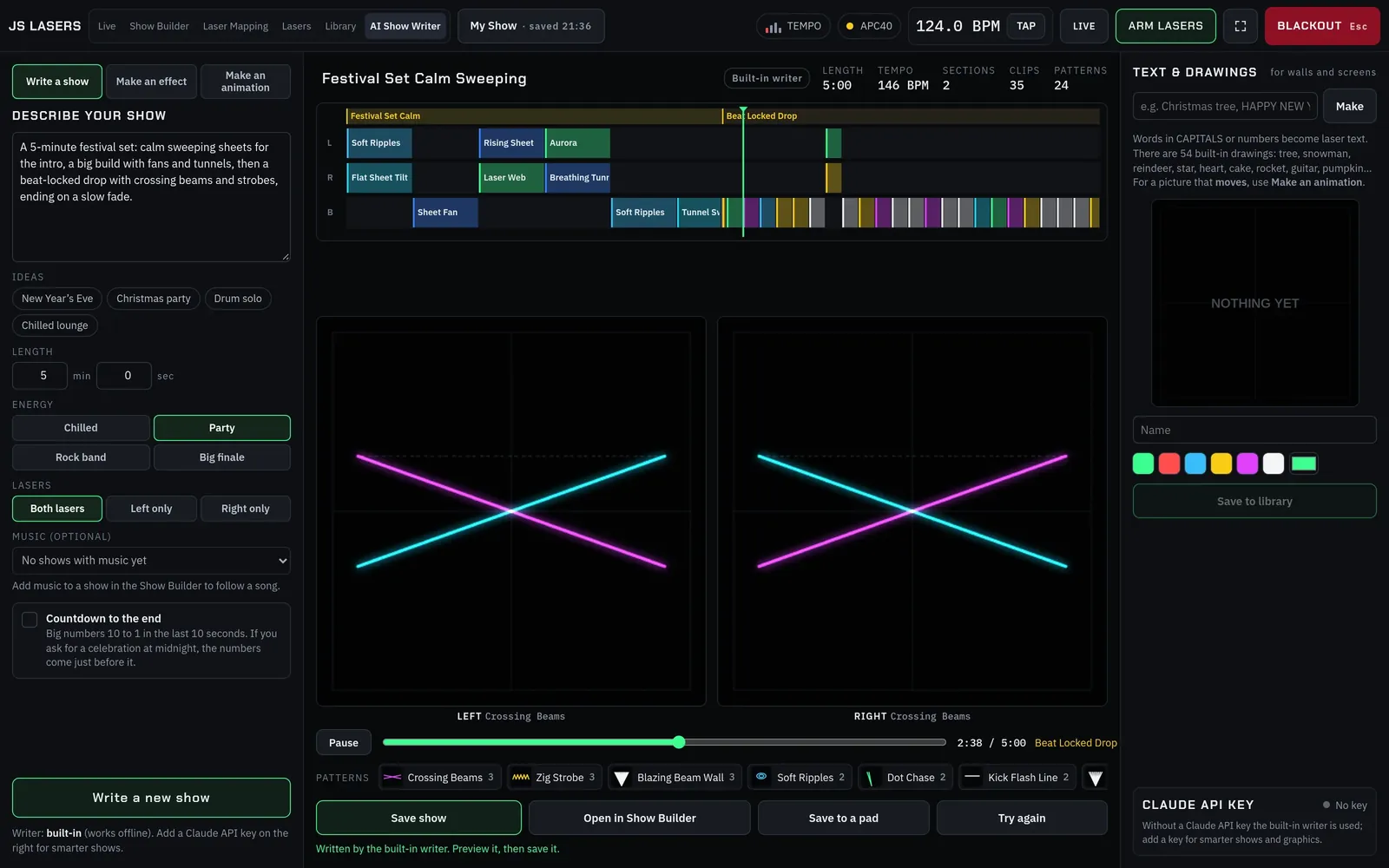
AI Show Writer

Describe the vibe. Get a show.

Tell JS Lasers what you want in plain words. It writes a complete timeline you can preview, edit and play. At launch, 100 AI credits a month are included, so there's no key to set up. The built-in writer even works offline.

Write a showA full timeline from a description.
Make an effectThree new music-reactive effects to pick from.
Make an animationCountdowns, text and drawings, from a sentence.
Your prompt

A 5-minute festival set: calm sweeping sheets, a big build, then a beat-locked drop with crossing beams

AI Show Writer
AI Show Writer showing a generated festival show timeline with left and right laser previews of crossing beams
See it live

Two cubes. One APC40. Real haze.

Placeholder · demo film of James's rig JS Lasers in 90 secondsLive APC40 jam, Show Builder and a building map1:30
Placeholder

Beta tester quote goes here, once we have real feedback from the private beta.

Name, role · city
Placeholder

Beta tester quote goes here, once we have real feedback from the private beta.

Name, role · city
Placeholder

Beta tester quote goes here, once we have real feedback from the private beta.

Name, role · city
Safety by design

Built safe from the first beam.

Lasers are powerful. JS Lasers is designed so the safe thing is always the default, and safe zones and the beam floor are applied after every effect.

30%
Starts disarmedNo light leaves a laser until you arm it, and brightness is capped at 30% to begin with.
Esc
Instant blackoutPress Esc in JS Lasers (or click Blackout) and every beam goes dark instantly. If the JS Lasers screen freezes, output blanks automatically. If the app or your Mac crashes, a LaserCube can keep projecting its last frame, so always keep the cube's own interlock or a hardware stop within reach.
0.5 s
WatchdogIf the app stops sending, the beam is blanked within half a second.
PIN
Safe zones and beam floorApplied last, so no effect can bypass them. Lock them with a PIN.

Always think safety.

Built-in effects are designed to stay above the crowd line, never park a full-power dot and strobe no faster than about 11 times a second. Safety features help, but the operator is responsible for safe use, local laws and any permits required.

Compatibility

Works with LaserCube. Built for Mac.

Get more from the projectors you already own: live control, timelines and mapping in one app, with proper handling of two or more cubes.

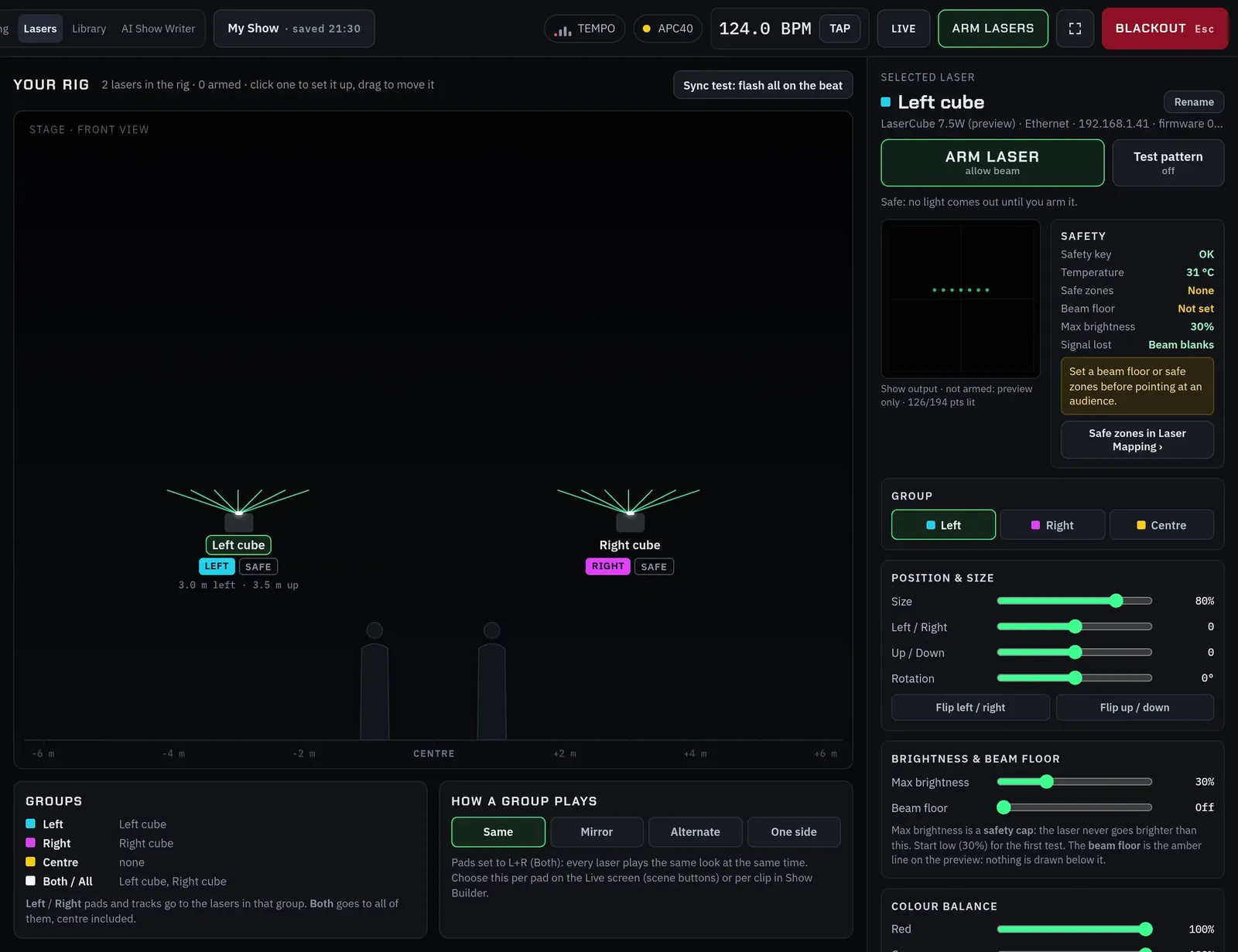
JS Lasers — Lasers
Lasers screen: two LaserCubes in the rig, with arming, safety status, position, size and brightness settings for the selected laser
Supported at launch

LaserCube projectors

Network models over Wi-Fi or Ethernet. Found automatically, or add one by IP. Calibrate size, position, rotation, brightness, beam floor and colour per laser.

Supported at launch

Akai APC40 MK2

Plug in over USB. 40 pads with matching pad lights, faders, knobs, crossfader and banks. No controller? Play the on-screen one.

Coming at launch

Your Mac

A packaged Mac app, ready to install at launch. Shows run locally on your Mac, with no account to sign in to at the gig and no internet needed.

On the roadmapAbleton LinkWindows

Built to work with LaserCube network lasers and the Akai APC40 MK2. Other lasers and MIDI controllers can be added on request: tell us at support@jslasers.com. LaserCube is a trademark of Wicked Lasers. JS Lasers is independent and not affiliated with Wicked Lasers or Akai.

Placeholder · photo of JamesPortrait of James at the desk or with his rig, 4:5
James SpenceFounder, JS Lasers
Why I built JS Lasers

Built by a show person, for show people.

Hi, I'm James Spence. I've been involved in lights and theatre since I was 16. Now in my 50s, I've spent much of my life as a DJ, then working in theatres and supporting bands and events all over the world.

A few years ago I was asked to add lasers to a show I was putting on, and for the size of the venue, the Wicked Lasers LaserCube MK2 fitted the bill. But I wasn't happy with the software. It was complicated, and it took far too long to piece together shows and do things like laser mapping and setting safe zones.

So I set out to automate those pieces and make it super quick to put a show together, and to tie it all to a controller, in this case the Akai APC40 MK2, so shows are easy to design and control.

That's how JS Lasers started, and I hope you like what you see.

Our mission

JS Lasers helps beginners design high-end shows in minutes. It's AI-driven, and AI safe-zone suggestions make mapping simpler.

Always think safety.James Spence
Pricing

One plan. Everything in it. Join early and lock in your founder price.

Try every feature free for 14 days, no card needed. Then subscribe yearly. Join early and your founder price stays locked while your yearly subscription is active.

The founder ladder

The earlier you join, the less you pay.

  1. $29.991–100Now
  2. $39.99101–300Tier 2
  3. $49.99301–500Tier 3
  4. $59.99501–700Tier 4
  5. $69.99701–900Tier 5
  6. $79.99901+Full price

Places count every sign-up ever. The price you join at is locked for as long as you stay subscribed. Prices per year, in US dollars.

Prices in US dollars, billed yearly. Local taxes are calculated at checkout.

FAQ

Questions, answered.

Can't find what you need? Email hello@jslasers.com

Does JS Lasers work with my LaserCube?

JS Lasers works with LaserCube projectors that connect over Wi-Fi or Ethernet. It finds them on your network automatically, or you can add one by IP address. Built to work with LaserCube network lasers and the Akai APC40 MK2. Other lasers and MIDI controllers can be added on request: tell us at support@jslasers.com. Please close LaserOS while JS Lasers is running, as both apps use the same network ports.

Do I need an Akai APC40?

No. The Live screen includes an on-screen APC40 MK2, so you can build and trigger everything with a mouse or trackpad. Plugging in a real APC40 MK2 gives you hands-on pads, faders and knobs, with the pad lights matching the screen. Built to work with LaserCube network lasers and the Akai APC40 MK2. Other lasers and MIDI controllers can be added on request: tell us at support@jslasers.com.

How does the 14-day free trial work?

Download the app and every feature is unlocked for 14 days, on your own lasers, with no card needed. After 14 days the app switches off until you subscribe. Your projects stay saved on your Mac, ready for when you do.

What does “locked founder price” mean?

Founder prices go up in steps as more people join, counting every sign-up ever. Your founder price stays locked for as long as you keep your yearly subscription active, and while JS Lasers continues to operate and develop the app. If you stop paying and rejoin later, you pay the current, higher price. New members may pay more.

How do AI credits work?

At launch, every subscription includes 100 AI credits a month, so there's no AI key to set up. If you need more, you can add a 250-credit top-up for $4.99, or bring your own Claude API key. The built-in writer also works offline without using credits. When you use AI features, your prompt (and, for the mapping safety check, your venue photo) is sent to our AI provider, Anthropic.

Is it hard to install?

No. At launch, JS Lasers will be a packaged Mac app that you download, install and open like any other Mac app. We'll confirm the exact steps and Mac requirements before release.

Do I need internet at the gig?

No. Shows run entirely on your Mac, with no account to sign in to at the gig. At launch, your licence will check in occasionally, with a 30-day offline grace period, so a venue without Wi-Fi won't stop a show.

Can I use my own ILDA files and artwork?

Yes. Import .ild files directly, turn a short GIF or video into a laser animation, or trace a picture into laser lines. Everything lands in your library, ready for pads and timelines.

Is there a Windows version?

Not yet. JS Lasers is Mac-first. A Windows version is on the roadmap. Join the list on the download page and we'll tell you when it's ready.

What if I cancel?

You can cancel any time in your account. Your subscription then won't renew, and you keep JS Lasers until the end of the year you've paid for. We don't refund for a change of mind after payment (that's what the free 14-day trial is for), but your legal rights if the software is faulty are unaffected. If you cancel, you lose your locked founder price. If you rejoin later, you pay the current, higher price.

Take your laser to the next level.

Download JS Lasers, build your first show tonight and run it on your own cubes. Free for 14 days, no card needed.